



Text-to-Speech (TTS) technology has transformed how businesses and individuals communicate, offering lifelike voice synthesis across various applications. From customer service to accessibility tools, TTS platforms provide fast, cost-effective solutions. This article compares five leading TTS models - Voxtell AI, ElevenLabs, OpenAI TTS, Azure AI Speech, and Google WaveNet - evaluating their voice quality, language support, customization, and integration capabilities.
Key Highlights:
- Voxtell AI: Ideal for real-time customer interactions with low latency and dynamic voice control but lacks transparent pricing.
- ElevenLabs: Known for emotional depth and voice cloning, it excels at realism but can be expensive for large-scale use.
- OpenAI TTS: Offers fast response times and natural tones but has limited voice options.
- Azure AI Speech: Supports over 140 languages with enterprise-grade tools but requires complex setup.
- Google WaveNet: Delivers smooth, natural speech with broad language support but lacks expressiveness for creative use.
Quick Comparison:
| Model | Strengths | Weaknesses |
|---|---|---|
| Voxtell AI | Real-time adjustments, seamless APIs for telephony tasks | Pricing undisclosed, focused on specific use cases |
| ElevenLabs | High realism, emotional range, voice cloning | Expensive at scale, stability concerns for high-volume usage |
| OpenAI TTS | Low latency, detailed customization | Limited voice library |
| Azure AI Speech | Broad language support, enterprise-ready tools, custom voices | Complex setup, higher latency for smaller projects |
| Google WaveNet | Natural rhythm, generous free tier, easy integration | Less expressive for storytelling |
Each platform suits different needs. For voice-driven customer engagement, Voxtell AI is a strong choice. ElevenLabs offers unmatched realism for premium content. Azure and WaveNet provide scalable solutions for enterprises, while OpenAI TTS balances speed and quality for interactive applications.
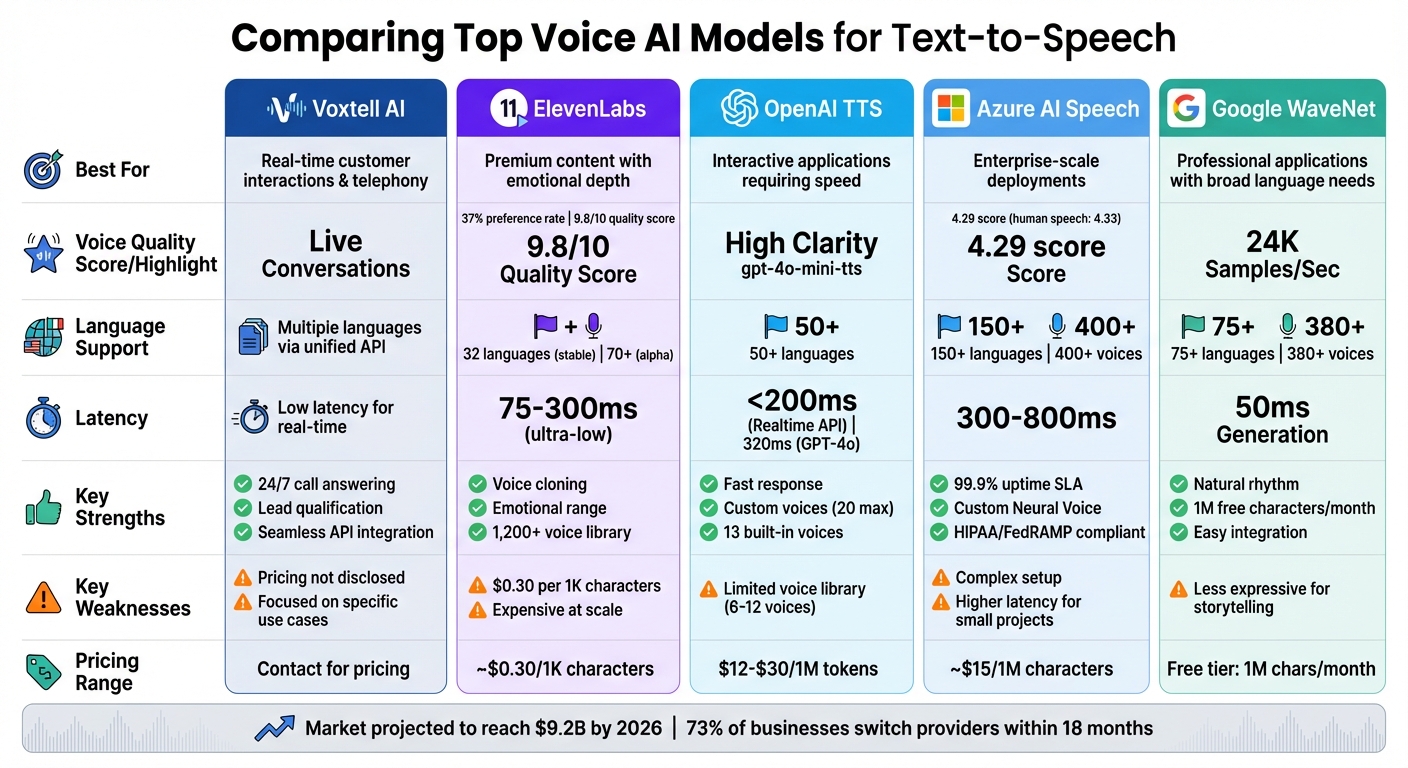
Voice AI TTS Models Comparison: Features, Strengths and Weaknesses
1. Voxtell AI
Voice Quality
Voxtell AI is designed to deliver top-notch voice quality specifically for real-time conversations, like phone calls and live interactions. Unlike systems built for pre-recorded content, it focuses on minimizing latency and maintaining consistent audio clarity. By controlling its entire communications stack - everything from the private network infrastructure to the voice engine itself - Voxtell AI ensures smooth performance, even during high-traffic periods.
Naturalness
The platform’s voice engine produces speech that feels alive and conversational. It incorporates subtle details like filler words and even soft laughter, making interactions sound genuinely human.
Language Support
Voxtell AI’s unified API connects seamlessly with various voice providers, offering a range of voice options tailored to different languages and accents. This flexibility ensures it can meet the needs of global audiences.
Customization Options
Voxtell AI allows users to make real-time adjustments to voice output during live calls. This application-layer control ensures the voice remains contextually relevant, adapting dynamically to the flow of conversation. It’s a feature that works hand-in-hand with its integration capabilities.
Integration Capabilities
The API is built to simplify integration, offering features like call answering, lead qualification, automated follow-ups, appointment scheduling, and call transfers. This means businesses can implement voice AI without needing to revamp their existing communication systems, saving time and effort while enhancing functionality.
2. ElevenLabs
Voice Quality
ElevenLabs stands out for delivering audio that rivals the quality of professional voice actors. In a survey, it earned top marks for voice clarity, with 37% of respondents favoring it compared to 19% for competitors. The platform boasts a library of over 1,200 voices, alongside a community-shared collection featuring more than 3,000 voices [15, 16]. Webb Wright, Contributing Writer at ZDNET, praised its capabilities, stating:
ElevenLabs is widely considered an industry leader in voice realism... that realism feels more closely aligned with the voice of a trained voice actor or professional podcaster.
This commitment to high-quality audio extends to its natural and realistic speech delivery.
Naturalness
The Eleven v3 (alpha) model excels at capturing emotional nuances, enabling it to laugh, sigh, or even whisper. While its polished output is impressive, some reviewers have noted it can feel overly refined for casual conversations. The platform also offers specialized models, such as Eleven v3, Multilingual v2, and Flash v2.5, with the latter providing low-latency performance at approximately 75ms.
Language Support
ElevenLabs supports 32 languages in its stable models and over 70 in the v3 alpha model. Notably, it retains unique speaker characteristics and accents even when switching between languages. This ability to preserve speaker identity across translations gives it a distinct advantage. For English-only projects, the English-specific models are recommended, as they tend to be more stable and deliver the best results.
Customization Options
The platform offers two cloning options: Instant cloning, which requires just 30 seconds of audio, and Professional Voice Cloning for creating high-quality, brand-specific voices. Users can tweak various parameters, including Stability, Similarity, Style Exaggeration, and Speaker Boost, to fine-tune the output. For example, Chess.com used ElevenLabs to design a lifelike voice for its virtual chess teacher, enhancing the learning experience for players. However, for real-time applications, users should manually normalize numbers and symbols (e.g., writing "one" instead of "1") since the Flash v2.5 model disables default normalization.
Integration Capabilities
ElevenLabs offers robust integration options, including REST APIs and SDKs for Python and TypeScript, simplifying deployment. It also supports WebSockets for real-time audio streaming and provides telephony-optimized audio formats, such as μ-law and A-law at 8kHz sample rates. These features make it easy to incorporate into various business environments. For instance, Decagon has utilized ElevenLabs' AI voice agents to deliver natural, conversational customer interactions. Additionally, the platform is GDPR and SOC II compliant, ensuring it meets stringent data protection standards. Together, these capabilities highlight its adaptability for diverse applications, as we delve deeper into its strengths and limitations below.
3. OpenAI TTS Model
Voice Quality
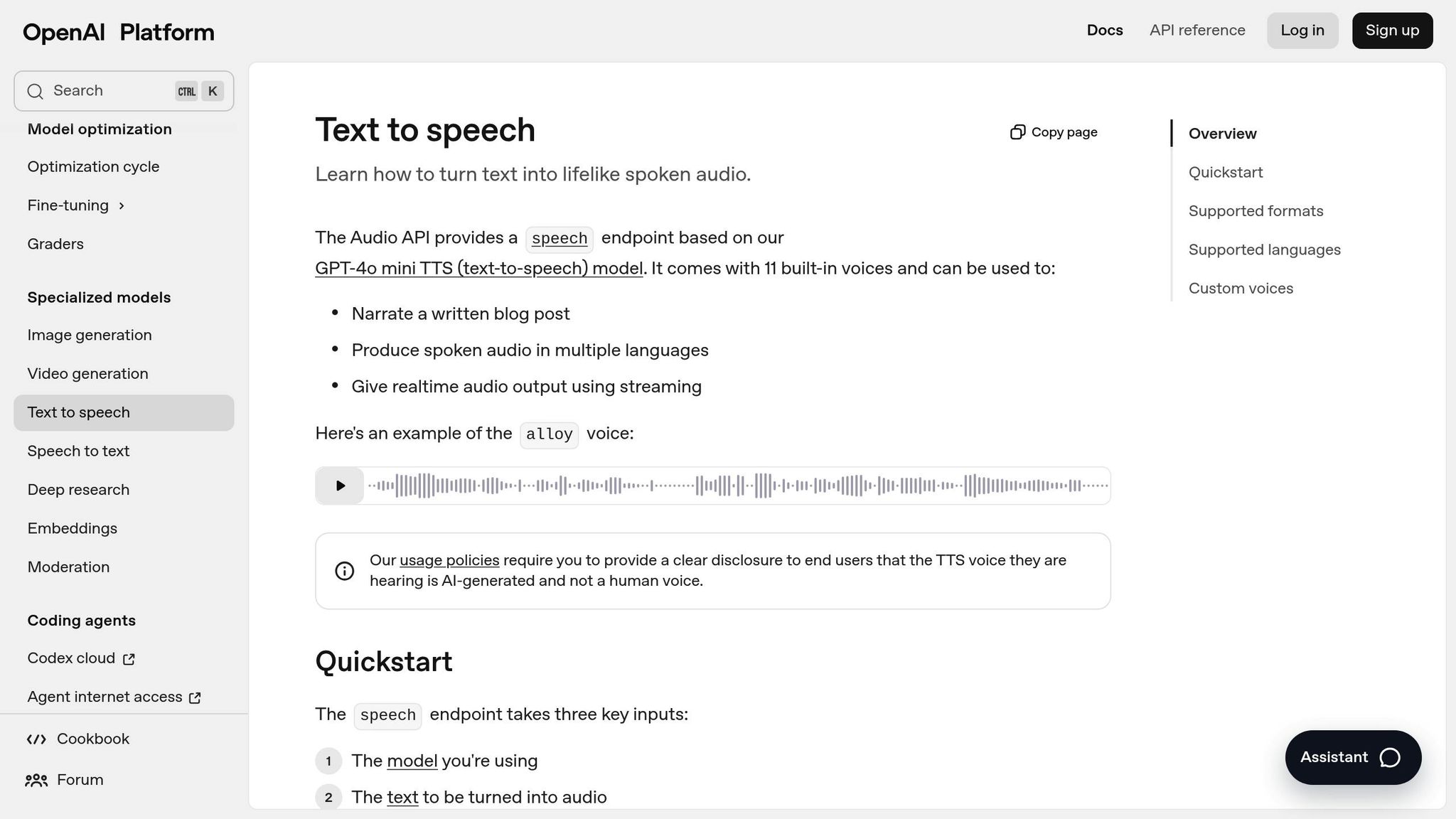
OpenAI provides three text-to-speech models, each tailored for different needs: tts-1 (geared towards speed), tts-1-hd (optimized for high-quality audio), and gpt-4o-mini-tts (the latest model offering top-tier performance). The tts-1-hd model delivers excellent audio clarity, but gpt-4o-mini-tts takes it a step further, minimizing robotic-sounding artifacts for a more polished output. Among the pre-designed voice options, marin and cedar are highlighted by OpenAI for their outstanding quality. These voices are clear, lifelike, and ideal for general narration. Kiryl Bahdanovich from Textogo praised the gpt-4o-mini-tts model, saying:
The gpt-4o-mini-tts model emerges as a perfect option, offering both higher quality and fast generation.
Let’s dive into how OpenAI achieves such natural-sounding speech.
Naturalness
The gpt-4o-mini-tts model offers impressive control over various elements of speech, such as accent, emotion, intonation, tone, and even whispering, making it versatile for different scenarios. OpenAI’s Realtime API enhances this by enabling speech-to-speech interaction, preserving nuanced phonetic details like prosody, pitch, and regional accents that are often lost in traditional text-to-speech systems. However, users have noted that when asked to mimic specific accents, such as British or Scottish, the model may sometimes revert to a neutral American accent after a few exchanges.
Language Support
OpenAI’s text-to-speech models support over 50 languages, including Arabic, Chinese, French, German, Hindi, Japanese, and Spanish. While the voices are primarily optimized for English, the system still performs effectively across many other languages. For multilingual or ambiguous text, users can add a language tag to guide pronunciation. The Realtime API has also enhanced its handling of non-English accents, even distinguishing between regional variations like European Spanish versus Argentinian Spanish.
Customization Options
OpenAI offers a range of customization features to meet diverse needs. There are 13 built-in voices, and eligible business customers can create custom synthetic voices by submitting a 30-second audio sample along with a formal consent recording from the voice actor. Companies can develop up to 20 custom voices to align with their brand identity. Additionally, the gpt-4o-mini-tts model allows users to adjust speech characteristics through natural language prompts, such as requesting a "cheerful tone". Audio output is available in several formats, including MP3, Opus, AAC, FLAC, WAV, and PCM. Pricing starts at $12.00 per 1 million tokens for gpt-4o-mini-tts and goes up to $30.00 for tts-1-hd. These features give businesses the flexibility to design voice interfaces that suit their specific needs.
Integration Capabilities
OpenAI’s platform integrates seamlessly through the Audio API, Realtime API, and Microsoft Azure AI Speech. It supports chunk transfer encoding, enabling audio playback to begin before the full generation is complete, which enhances user engagement. For applications requiring quick response times, OpenAI suggests using WAV or PCM formats to avoid decoding delays. The Realtime API operates with WebSocket streaming, achieving response times under 200ms. However, using OpenAI voices through Azure introduces higher latency (over 500ms) compared to native Azure Speech services, which maintain latency under 300ms. OpenAI also emphasizes the importance of disclosing to end-users that the voices are AI-generated.
4. Azure AI Speech TTS
Voice Quality
Azure's Uni-TTSv4 model has reached a point where its synthetic speech is virtually indistinguishable from human recordings. Blind testing revealed that the Jenny voice scored 4.29, compared to 4.33 for natural human speech - an incredibly close match. Microsoft Research highlighted this achievement:
Neural TTS has now reached a significant milestone in Azure, with a new generation of Neural TTS model called Uni-TTSv4, whose quality shows no significant difference from sentence-level natural speech recordings.
Azure also provides HD models tailored to various needs. For example, DragonHD offers enterprise-level quality with precise pronunciation, while DragonHDOmni includes over 700 voices, featuring enhanced expressiveness and automatic emotion detection. The platform delivers high-fidelity audio at multiple sample rates, including 8, 16, 24, and 48 kHz. Companies such as Duolingo, AT&T, and Progressive rely on Azure Neural TTS for their voice applications. These advancements demonstrate Azure's commitment to delivering high-quality speech synthesis.
Naturalness
Azure’s deep neural networks tackle stress and intonation alongside voice synthesis, ensuring fluid, lifelike speech that’s easier on the ears. The HD voices can identify emotions in text and adjust tone in real time, enhancing the natural feel. By analyzing input text, these voices automatically modify emotion, pace, and rhythm, making them ideal for real-time interactive applications.
Language Support
Azure supports over 150 languages and dialects, offering more than 400 neural voices across various regions. It also provides localized options to match specific accents and dialects, ensuring better alignment with regional preferences. For multilingual projects, developers can leverage Speech Synthesis Markup Language (SSML) to fine-tune elements like pronunciation, pitch, rate, and pauses. Additionally, the DragonHDOmni model boasts over 700 voices and supports 100+ speaking styles.
Customization Options
Azure takes customization to the next level with Custom Neural Voice (CNV). This feature allows businesses to create unique, brand-specific voices using as little as 30 minutes of audio data. Through SSML, users can refine speech characteristics such as pitch, speed, volume, and pauses. Pricing starts at about $15 per million characters (with Chinese characters counting as two) for standard voices. Custom voice development is billed based on compute hours (20–40 hours per style), with additional hosting fees. These tools enable businesses to create voices that align perfectly with their brand identity and customer engagement strategies.
Integration Capabilities
Azure offers flexible deployment options to suit various use cases, including cloud-based, containerized edge, and on-device solutions. Developers can use SDKs for .NET, Python, Java, JavaScript, and C++ to integrate Azure TTS into their applications. The platform supports both real-time synthesis for interactive scenarios and batch synthesis for longer content like audiobooks or podcasts. It also integrates seamlessly with Office 365, making it a natural fit for Microsoft-centric enterprises. For healthcare applications, Azure ensures HIPAA compliance, addressing strict regulatory needs.
5. Google WaveNet
Voice Quality
WaveNet stands out in the world of voice synthesis by generating speech waveforms sample-by-sample at an impressive rate of 24,000 samples per second. Using a generative neural network, it creates one second of speech in just 50 milliseconds - making it 1,000 times faster than its initial version. Unlike older systems that rely on piecing together pre-recorded sound clips, WaveNet trains directly on raw audio samples of real human speech. This approach allows it to replicate human-like emphasis and inflection with remarkable precision.
When it was first introduced, WaveNet cut the gap between human and computer-generated voices in half for both American English and Mandarin Chinese.
Naturalness
What sets WaveNet apart is its ability to capture subtle details like breathing, lip-smacking, and natural intonation. These elements give its voices a sense of warmth and fluidity, moving away from the overly mechanical tones of traditional systems. Koray Kavukcuoglu, Vice President of Research at Google DeepMind, highlighted its impact:
"WaveNet rapidly went from a research prototype to an advanced product used by millions around the world."
By predicting sound sequences at a high resolution, WaveNet delivers smoother and more natural speech patterns. This makes it an excellent choice for professional applications, including brand representation and customer-facing services. Additionally, its dynamic voice capabilities extend across a broad range of languages.
Language Support
Google Cloud Text-to-Speech, powered by WaveNet, offers over 380 voices in more than 75 languages and variants. Supported languages include Arabic, Bengali, English, Mandarin Chinese, and Dutch, among others. The platform provides businesses with a generous free tier - up to 1 million characters for WaveNet voices each month - with additional usage billed per 1 million characters.
Customization Options
WaveNet offers a range of customization features through Speech Synthesis Markup Language (SSML) tags. These allow users to fine-tune speech output by adding pauses, adjusting pronunciation, and formatting dates or times. Businesses can tweak pitch by up to 20 semitones, control speaking rates from 0.25× to 4×, and set volume gain between –96 dB and +16 dB. Additionally, Audio Profiles optimize the output for specific hardware, such as phone systems or high-quality headphones. For brands seeking a unique voice identity, WaveNet supports custom voice model training using their own studio-quality recordings.
Integration Capabilities
WaveNet integrates seamlessly via REST and gRPC APIs, supporting various audio formats like MP3, Linear16 (WAV), and OGG Opus. It works across a wide range of devices, including IoT gadgets, PCs, tablets, and smartphones. Businesses can use it to create voicebots for contact centers, enable voice interfaces for IoT devices, or incorporate accessible electronic program guides.
Strengths and Weaknesses
After analyzing the features of each voice AI model, it's clear that each platform has its own strengths and trade-offs. These differences make it easier for businesses to choose the right technology based on their specific needs - whether it’s for real-time customer support, multilingual content creation, or crafting a unique voice identity.
The table below highlights the primary strengths and weaknesses of each platform, focusing on voice quality, language support, customization options, and practical deployment factors.
| Model | Key Strengths | Key Weaknesses |
|---|---|---|
| Voxtell AI | Offers 24/7 call answering, lead qualification and scoring, automated follow-ups, seamless integrations, appointment scheduling, and call transfer. | Pricing details are not publicly disclosed; mainly designed for telephony and customer engagement tasks. |
| ElevenLabs | Exceptional emotional range with a 9.8/10 quality score in blind testing; high-fidelity voice cloning; supports over 30 languages; ultra-low latency (100–300ms) for real-time applications. | Higher costs at scale (about $0.30 per 1,000 characters); potential stability challenges for high-volume usage. |
| OpenAI TTS | Low latency and excellent clarity; well-suited for interactive agents and conversational applications; pricing ranges from $15–$30 per 1 million characters; supports 57–100+ languages. | Limited voice selection (6–12 distinct voices), which can restrict creative flexibility, especially in storytelling scenarios. |
| Azure AI Speech | Scalable for enterprise use with a 99.9% uptime SLA; HD neural voices with emotional tone control; Custom Neural Voice for brand-specific identities; supports 140+ languages and 400+ voices; FedRAMP compliance and container deployment options. | More complex setup tailored for developers; latency ranges from 300–800ms; may not be the most cost-effective choice for smaller-scale projects. |
| Google WaveNet | Delivers natural rhythm and intonation; supports over 380 voices across 75+ languages; offers a generous free tier of 1 million characters per month; integrates easily via REST and gRPC APIs. | Less expressive for dramatic storytelling or theatrical use; not specifically optimized for contact center applications. |
As shown in the table, each model has its own advantages and limitations that impact how it can be used effectively. Sergey Nuzhnyy, Head of Product Analytics at AIMLAPI, highlights that ElevenLabs stands out for its realism and emotional depth. However, its higher costs make Azure AI Speech and Google WaveNet appealing alternatives for businesses seeking broad language support and reliable APIs. For real-time use cases, ElevenLabs and OpenAI TTS excel, though OpenAI’s smaller voice library could be a limiting factor.
These comparative insights offer a concise guide for matching business needs with the right platform. For premium content creation, ElevenLabs’ emotional depth is a standout feature. Large-scale enterprise projects are well-suited to Azure AI Speech’s customization options or Google WaveNet’s extensive language support. Meanwhile, Voxtell AI is an ideal choice for voice-based customer engagement tasks like telephony and lead management.
Conclusion
When selecting a voice AI model, it's essential to align it with your specific business needs. With the text-to-speech (TTS) market projected to reach $9.2 billion by 2026 and 73% of businesses switching providers within 18 months due to hidden costs and integration challenges, performance and reliability should be top priorities.
For real-time applications, focus on models with latency under 500 milliseconds. OpenAI's GPT-4o, for instance, delivers an impressive 320 ms latency, helping to avoid user drop-off, which tends to increase after 700 ms. ElevenLabs also provides low-latency performance via its streaming API, though its costs can be as much as three times higher at scale.
Budget considerations are equally important for long-term sustainability. Some platforms offer affordable rates - starting as low as $4 per 1 million characters - while others average $15–$16 per 1 million characters. The right choice will depend on your usage volume and the features you require.
Beyond speed and cost, functional specialization plays a crucial role. Each platform brings unique strengths, such as emotional nuance or multilingual support. For businesses prioritizing customer engagement through telephony, Voxtell AI shines with its tailored features. These include 24/7 call answering, lead qualification and scoring, automated follow-ups, and seamless integrations, all optimized for voice-driven customer interactions.
FAQs
What should I consider when choosing a text-to-speech model for my business?
When choosing a text-to-speech (TTS) model for your business, prioritize voice quality and how closely it mimics natural human speech. A lifelike voice enhances customer interactions and ensures messages are delivered clearly. It's also a good idea to explore models that support a variety of languages and accents. Some even allow you to create custom voices that reflect your brand's personality.
You'll also want to think about cost and scalability, particularly if your business handles a large volume of audio content. Opt for models that process audio quickly while maintaining high quality - this can save both time and resources. Finally, assess the integration features. Look for reliable APIs and options to tweak elements like speaking rate or tone. These tools make it easier to incorporate the TTS solution into your existing workflows, whether you're using it for customer service, employee training, or other purposes.
How does customizing voice settings improve text-to-speech applications?
Adjusting voice settings lets businesses tweak elements like pitch, tone, speed, accent, and expression to match their brand’s personality and meet audience expectations. Thanks to advancements in AI-powered text-to-speech (TTS) technology, it's now possible to create voices that sound natural, expressive, and even personal.
This level of customization allows companies to craft voices that fit specific needs - like warm and conversational tones for customer service, authoritative styles for instructional materials, or regional accents to resonate with local audiences. Beyond enhancing user engagement and brand identity, these tailored voices can improve accessibility. For example, slowing down speech can help visually impaired users, while emphasizing key phrases ensures clarity in important messages.
By fine-tuning these details, TTS solutions can deliver experiences that are not only functional but also memorable - something that U.S. consumers increasingly value.
What challenges do businesses face when using text-to-speech technology?
Businesses adopting text-to-speech (TTS) technology often face a few significant obstacles. One of the biggest challenges is creating natural-sounding voices. Synthetic voices sometimes come across as robotic, with odd pauses or mispronunciations that can erode customer confidence. Replicating human-like intonation, rhythm, and stress patterns is no small feat, especially when dealing with tricky elements like abbreviations, numbers, or specialized industry terminology. These issues become even more pronounced when trying to accommodate multiple languages or regional accents.
Another frequent challenge is system integration. Integrating TTS solutions with existing platforms - like CRM or IVR systems - often involves extensive technical work, such as custom API development. Even after integration, ensuring the system runs smoothly is critical. Failures during high-traffic periods can disrupt essential customer interactions. On top of that, operating high-quality TTS models in real time demands significant resources, which can drive up infrastructure costs for businesses that require fast, low-latency responses.